


How to Add a Private Social Wall to Your Sales Kickoff (No Public Posting Required)
Published on August 31, 2026

You spend months planning a sales kickoff. You book the venue, line up the speakers, and put together an agenda packed with product updates, awards, and big goals for the year. Then the general session starts, and the room feels flat. Reps sit and listen. The remote folks on the video call are somewhere between paying attention and checking email. Nobody asks the question everyone is thinking. The wins your top performers pulled off last quarter go unmentioned because there was no good moment to bring them up.
This happens at a lot of internal meetings, and it is not because your people do not care. It is because there is no easy way for them to speak up in a big room full of coworkers and leadership. So they stay quiet, and all that energy stays locked inside their heads.
A sales kickoff social wall fixes that. It puts a live screen at the front of the room that shows posts from your team as they come in. The catch that stops most planners cold is a fair one: reps do not want to post something on public social media that their boss, their prospects, and their competitors can all see. Here is the good news. They do not have to. You can run the entire wall privately, with nothing ever touching X, Instagram, or any public network. This guide walks you through how to set that up for your sales kickoff.
What a Private Social Wall Actually Is
A private social wall works the same way a public one does, with one big difference. Instead of pulling posts from public social media accounts, it only pulls content from sources your team already uses inside the company or from a simple submission form. No one outside your organization sees any of it.
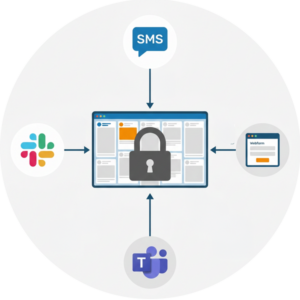 At Everwall, we support 15 different content sources, and several of them are built for exactly this kind of private, internal event engagement:
- Slack — reps post to a channel and it appears on the wall
- Microsoft Teams — same idea, using a channel your company already runs
- Webex — great if your kickoff runs through Webex for remote attendees (we partnered with Webex to make this smooth)
- SMS — people text a message and photo to a number, no app needed
- Everwall Direct — a web form, usually accessed via a QR code, where reps type a post and attach a photo, all within your event
None of these connect to public social media. A rep in the back row can send a shout-out from their phone, and the only place it shows up is your screen after a moderator approves it. That last part matters, and it is where we go next.
Setting Up Your Sales Kickoff Social Wall Step by Step
You do not need a tech team to get this running. The setup breaks down into three decisions, and each one keeps the wall private and under your control.
Step 1: Pick your private content sources
Start by choosing which of the sources above your team will actually use. Most companies already live in either Slack or Microsoft Teams, so pick the one your reps check every day. Then add Everwall Direct and SMS as backups, since those work for anyone, even a partner or vendor who is not on your internal chat tools.
If part of your sales team joins remotely, Webex is a smart addition. Remote reps often feel the most disconnected at a kickoff because they are watching a screen instead of sitting in the room. Giving them a way to post keeps them part of the conversation.
Skip the public networks entirely. When you build the wall, simply do not connect X, Instagram, LinkedIn, or Facebook. The wall will only ever show what comes in through the private channels you picked.
Step 2: Turn on moderation so posts are approved first
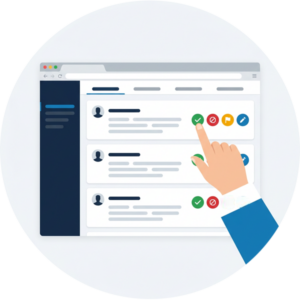 This is the setting that makes everything work. With moderation turned on, nothing shows up on the screen until a person on your team approves it. A rep sends a post, it lands in a review queue, and a moderator taps approve or deny. Only approved posts hit the wall.
For an internal meeting, moderation does two jobs. It keeps anything off-topic or inappropriate from showing up in front of leadership, and it lets you group posts together so the screen tells a story instead of showing random one-offs. If you want to go deeper on this, we wrote a full guide on social wall moderation best practices that applies here too.
One thing worth knowing: Everwall gives you an unlimited number of moderators, and moderation works from a phone. During a busy general session, you can have two or three people approving posts from their seats while the show goes on. No one has to be stuck at a laptop backstage.
Step 3: Plan where the sales kick off social wall shows up in the room
The wall only works if people can see it. In most general sessions, the main screen is busy with slides and speakers, so plan for a second display. A side screen, a lobby monitor, or a panel next to the stage all work well. During breaks and transitions, you can throw the wall up on the main screen to give it a moment in the spotlight.
Your Everwall social wall also includes a website embed at no extra cost. That means you can drop the same wall into your event app or an internal event page, which is perfect for remote reps who are not in the room at all. Everyone sees the same live feed no matter where they are sitting.
What to Put on the Wall
An empty wall is awkward, so give your team clear reasons to post. These four types of content work well at a sales kickoff and keep the internal event engagement flowing.
Win submissions. Ask reps to post their best deal, biggest save, or proudest moment from the year. Approve them in batches so the wall fills with a run of wins during an awards segment. Seeing a teammate’s win on the big screen does more for morale than any slide you could build.
Shout-outs. Let people recognize each other. A rep thanking the sales engineer who saved a deal, or a manager calling out a quiet closer, gives the room a warm, human moment that leadership cannot script.
Leadership AMA questions. Running an ask-me-anything with your VP or CRO? Have reps submit questions through the wall. Moderation lets you screen out duplicates and pick the strongest ones, and shy reps get to ask the hard question without standing up at a microphone.
Poll results. Show live poll numbers on the wall during a session. It gives the room a reason to look up and see how everyone answered.
For more content ideas built around getting people to actually participate, our post on social wall content ideas covers plenty you can borrow.
Why This Beats Just Hoping People Speak Up
 Internal meetings run into the same wall over and over. Questions go unasked because raising your hand in front of 300 coworkers is scary. Wins go unseen because there was no natural moment to share them. Remote reps drift off because nothing on their screen invites them in.
A private social wall gives everyone a low-pressure way to join in. Typing a post from your phone is a lot easier than standing up to speak, so you hear from people who would normally stay silent. And because it all runs through private sources with moderation, you get all of that participation without a single post landing on public social media.
If you want the bigger picture on making internal communication more visible year-round, our piece on the internal comms social wall is a good companion read. And if you are still working out the agenda itself, we pulled together ideas in our post on increasing engagement at your national sales meeting.
Running More Than One Internal Event This Year
Plenty of companies do not stop at a kickoff. There is the SKO in January, a mid-year check-in, a leadership summit, maybe a holiday all-hands. If your calendar looks like that, a single event social wall covers the kickoff, and you may want a setup that carries across the whole year.
Our Event Social Wall is billed per event, so it fits a one-time kickoff perfectly. For companies running several internal events, we offer an All Access for Business plan that lets you run walls across multiple events without setting up each one from scratch. If your team meets often, that path usually makes more sense than booking each event on its own.
The point stands either way. Whether it is one kickoff or six events a year, you can put a live, participatory wall in front of your sales team and keep every post private.
Ready to build a sales kickoff social wall? Our Event Social Wall runs entirely on private sources like Slack, Teams, Webex, SMS, and Everwall Direct, with full moderation so you approve every post before it shows. Set it up in an afternoon and give your team a reason to speak up, no public posting required.
Pretty good, right? Share this with your people.


